
 学生アカウントを作成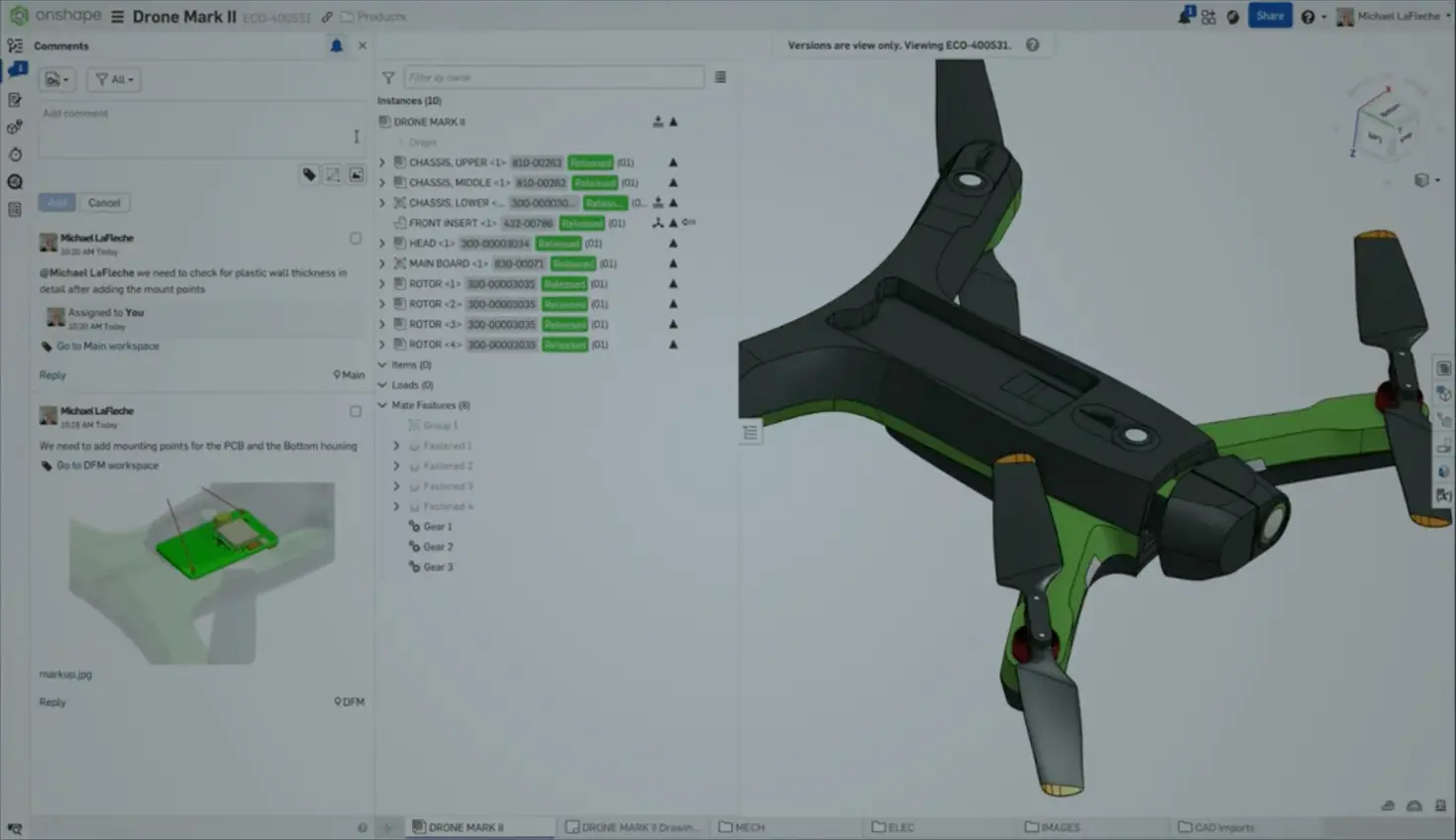
05:15
Summary
- The Onshape-Arena Connection automatically syncs BOMs, design data, and approvals.
- Enables “shifting left” so suppliers can review working designs pre-release while Arena’s AI flags component risk early.
- It’s built in with no middleware to manage, takes about 16 weeks to implement, and is available on AWS GovCloud for an export-controlled environment.
The Onshape-Arena Connection synchronizes design and product data automatically, allowing engineers, procurement teams, and manufacturing partners to work from the same live information without file exports or version confusion. The result: Component risks get flagged during design instead of procurement, suppliers review working designs before formal release, and Bill of Materials (BOMs) sync with one button instead of manual re-entry, eliminating the delays and rework costs that come from finding problems late.
Why “Shifting Left” Actually Matters
Traditional CAD-PLM workflows make early collaboration nearly impossible because engineers work in isolated files, manually export data to spreadsheets, and email information to partners who inevitably work from different versions. By the time formal reviews happen, designs are locked, and any issues trigger expensive engineering change orders.
“Shifting left” – moving supplier reviews, component sourcing, and manufacturability checks earlier in development – compresses timelines and reduces costs, but it requires systems that actually communicate.
The Onshape-Arena Connection enables “shifting left” by moving supplier reviews, component sourcing, and manufacturability checks into the design phase, when changes compress timelines and reduce costs.
BOMs Flow Automatically From CAD to PLM
When an engineer builds an assembly in Onshape, one button syncs the entire BOM to Arena, where part numbers, descriptions, and materials flow through based on category mappings configured during setup. Arena then enriches the BOM with supplier data, manufacturer part numbers, and supply chain risk monitoring that doesn't belong in the CAD environment.
Procurement sees component selections the moment engineers add them, rather than waiting weeks for formal BOM releases. For a PCB assembly, as an example, mechanical engineers model the board outline in Onshape for fit checking while the purchasing team populates the components and checks with suppliers using Arena’s embedded Supply Chain Intelligence to find an alternative source for a part.
Each discipline works where it makes sense. The data stays connected.
From Daily Tasks to Formal Approvals Seamlessly
Product development needs two types of collaboration at different stages, and most systems only handle one well.
Informal collaboration is how design actually happens. Engineers need to sketch ideas, get quick feedback, and iterate without approval processes slowing them down. In Onshape, this means dropping comments directly on 3D geometry ("@Mike - check this wall thickness before we release"), assigning tasks that travel with the design ("add mounting standoffs for PCB"), and working simultaneously in the same assembly like Google Docs. The collaboration happens where the work happens, not in a separate system.
Formal control takes over when designs move to production. Engineering change orders (ECOs) need defined approval chains, complete traceability, and controlled access to revision-managed data. Arena handles this – routing ECOs to the right stakeholders, tracking who approved what and when, ensuring suppliers only see approved revisions.
The difference from traditional implementations: Engineers don’t leave their CAD environment to initiate formal processes. They click “Create Release” in Onshape, search for the ECO number from Arena, and the form auto-populates. Onshape generates PDFs and STEP files. Arena routes approvals. Status updates automatically in both systems when complete.
Arena’s Supply Chain Intelligence Flags Component Risks Early
Arena’s Supply Chain Intelligence (SCI) uses AI to monitor bill of materials health and flag component risks throughout the product lifecycle – supply chain disruptions from natural disasters, geopolitical conflicts, part shortages, end-of-life notices, compliance changes, and other factors that could delay production. The system embeds real-time electronic component data directly into Arena’s BOM view, automatically flagging components showing zero stock, end-of-life status, or other risk factors with supply chain risk ratings.
Click “Find Alternative” and Arena searches its database for matches based on specifications. This AI-driven intelligence connects engineering and sourcing teams so component selection decisions factor in supply chain information from the start.
Suppliers See Current Data, Not Emailed Files
Arena’s supplier portal gives contract manufacturers controlled access to product data. You provision their access to specific items, they log in and see current approved revisions with complete BOMs and drawings. When you release a new revision, they see it automatically – no accidentally working from old versions.
Share working revisions before formal release and manufacturers can identify issues while changes are still inexpensive. A molding house reviews plastic part designs before tooling is ordered. A PCB assembly house checks component selections for solderability during the design development phase.
The Connection Is Built In, Not Added On
The connection is native functionality in both applications – no integration software to install, no middleware to manage. Both are cloud-native SaaS on AWS that communicate through documented APIs maintained by PTC. Configuration happens through enterprise settings, where you map categories and establish part numbering schemes.
Implementation averages 16 weeks, mostly workshops to map workflows and train teams. Most customers have a super user who handles administration as part of their broader role, not full-time. For companies with export control requirements, both offer AWS GovCloud deployments meeting government security standards.
Does Version Chaos Cost You Time and Money?
If your engineers spend hours tracking down the latest BOM revision, if procurement discovers component shortages that could have been flagged during the design phase, or if suppliers work from outdated files because someone forgot to send the update, the Onshape-Arena Connection eliminates these problems by keeping everyone synchronized automatically.
The real question: How many hours does your team waste on file management and version confusion each week, and what would those hours be worth if spent on actual product development instead?
Bring the Power of Cloud to your Business.
With Onshape, your teams get a secure, scalable, capability-rich product development platform delivered as a reliable service in the cloud.
よくある質問 (FAQ)
Onshape for Enterprises
Move fast. Stay aligned. Design better with cloud-native product development.
最新コンテンツ
- ブログ
- News from Onshape @ PTC
- Artificial Intelligence
- カスタム機能
From Onshape Labs, the FeatureScript MCP Server: The Fastest Path to AI-Driven Design
08.11.2026 もっと見る- ブログ
- Evaluating Onshape
- Model Based Definition
- PCB Studio
- レンダリング
- シミュレーション
- Integrations
Onshape Features That Keep Your Design Data Connected: August 2026 Highlights
08.05.2026 もっと見る