
 学生アカウントを作成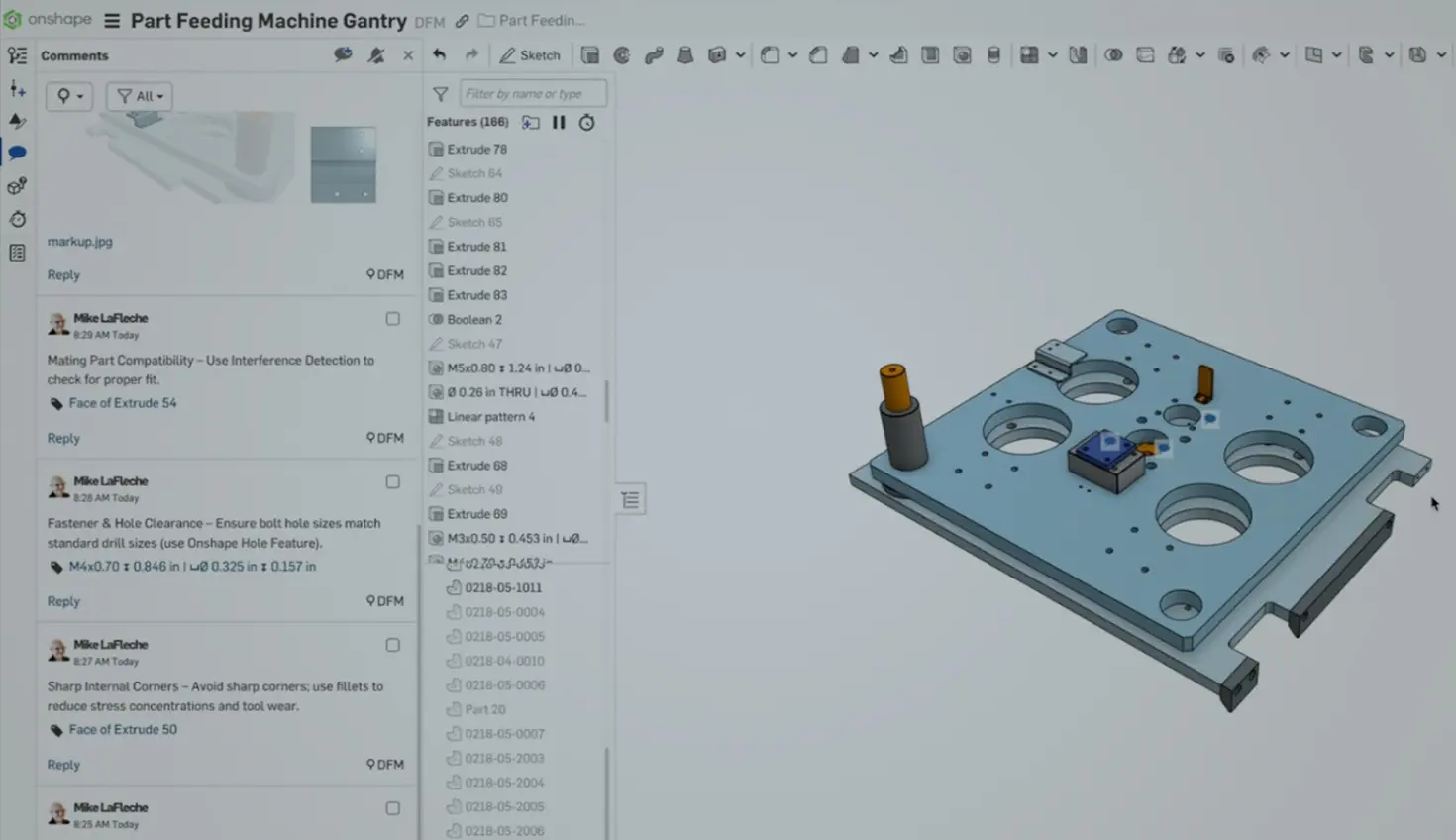
00:00
Summary
- Cloud CAD software brings manufacturing into the design process early.
- Analysis, version control, and built-in CAM catch DFM issues sooner.
- Distributed teams sharing one live model avoid the high cost of finding problems late.
The biggest Design for Manufacturability (DFM) failures happen when engineers work in silos until it’s too late. Cloud-native CAD platforms like PTC’s Onshape now let multiple people work on the same design simultaneously – no file conflicts or check-out headaches.
The game-changer? Give your manufacturing partner view-only access with full analysis tools. They can check draft angles and wall thickness in your actual model without being able to edit or copy your design. Get their feedback while you’re still sketching, not after you’ve cut tooling.
Can You Run Analysis Without Slowing Down?
Modern cloud CAD platforms offload heavy analysis to AWS servers instead of your local machine:
- Draft analysis instantly highlights problem areas on plastic parts with hover-over angles for any face
- Thickness analysis shows potential sink marks or areas needing thermal management before you commit to tooling
- Stress and modal analysis runs in the background while you keep working – no waiting for results
You can literally work on exploded views while simulations crunch numbers server-side. No spinning fans, no frozen screens.
Should You Design Parts Together?
Instead of isolated files for every part, build related components in one workspace. Onshape's multi-part Part Studios let you drill holes through multiple parts at once – and they'll actually align. Reference the same geometry across a bracket assembly.
This mirrors how you actually think about designs in systems, not individual parts.
Bonus: Hole tables automatically track every hole in your design. Even if you forget to use the hole tool and just extrude-cut something, community-made features can tag it retroactively.
How Do You Test Changes Safely?
Trying a DFM optimization shouldn't require "Save As" and duplicate file management. Modern version control lets you branch your design, test changes, and merge back if they work or abandon them if they don't.
Every action saves automatically with full history. Need to restore to a healthy state after discovering an issue? Just roll back to any point in time. No hunting for pack-and-go files or backup folders.
When Should You Check Manufacturability with CAM?
Built-in CAM capabilities let you test manufacturability before release. Pull your part geometry, define tool paths, and generate G-code in the same platform where you designed it.
Custom features can auto-calculate stock size and populate your properties. Package everything – drawings, inspection reports, setup sheets, G-code – into a single publication for your shop floor. Some engineers even use ChatGPT to generate setup sheets from G-code automatically.
Where Can You Get “Free” DFM Reviews?
App store integrations like Xometry can quote your parts and analyze your design, flagging manufacturability issues. Sharp corners that need filleting, holes too close to bends, and wall thicknesses that will cause problems.
Think of it as a free DFM review every time you check pricing. Even if you don't order the part, you've identified issues while they're still cheap to fix.
What If Your Team Is Distributed?
Platform-agnostic tools mean your CM in Vietnam sees exactly what you see – same version, no compatibility issues, no IT infrastructure. Share a link and they're looking at your live model, not a static file that might be outdated.
Works on any device: workstations, laptops, tablets, even phones. Your manufacturing partner can review designs from the shop floor if needed.
What Does Finding Problems Late Actually Cost?
Here’s the reality: Finding a problem in production costs more than catching it in design. Every day delay in discovering an issue multiplies the cost exponentially.
Get manufacturing involved early. Let them see your work in progress. Build feedback loops before you commit to tooling. The tools exist now to make this easy – no more excuses about file compatibility or access issues.
Traditional CAD workflows were built for an era of isolated workstations and annual release cycles. Modern engineering is distributed, collaborative, and iterative. Your tools should match that reality.
If you’re still discovering manufacturability issues after release, it's time to rethink your workflow, not your manufacturing partners.
オンシェイプ・ディスカバリー・プログラム
資格のあるCADプロフェッショナルがOnshape Professionalを最大6か月間無料で取得する方法をご覧ください。
最新コンテンツ
- ブログ
- Evaluating Onshape
- Artificial Intelligence
- カスタム機能
5 Ways Teams Can Leverage the Onshape FeatureScript MCP Server
08.20.2026 もっと見る- ブログ
- News from Onshape @ PTC
- Artificial Intelligence
- カスタム機能
From Onshape Labs, the FeatureScript MCP Server: The Fastest Path to AI-Driven Design
08.11.2026 もっと見る