
 Crear una cuenta de estudiante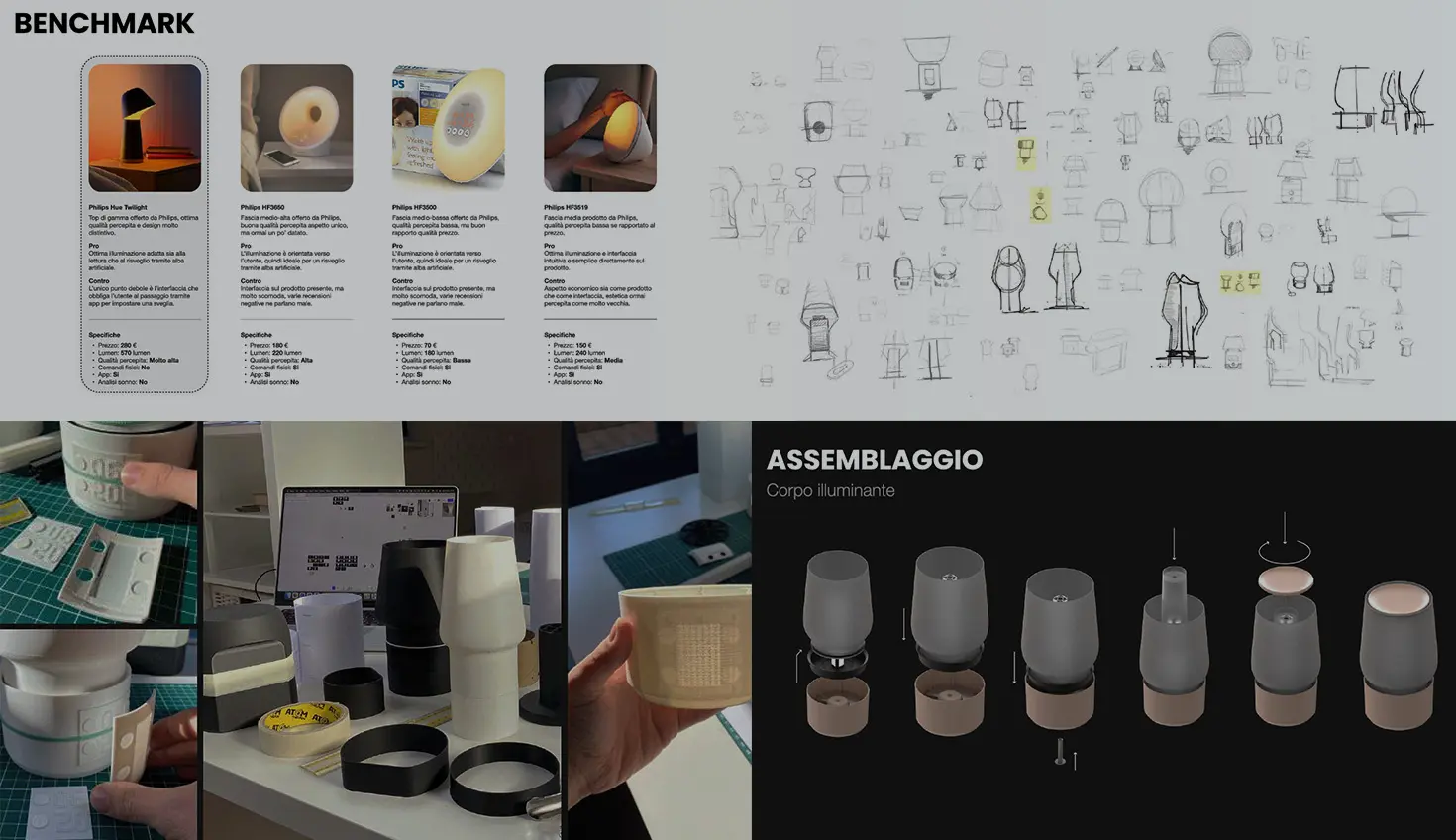
00:00
Summary
Use your portfolio to tell the story of a project and Onshape to showcase the engineering work behind it. Together, they create a more compelling picture of your skills and design process.
If you're a student preparing for college, applying for internships, competing in engineering challenges, or simply looking to showcase your work, you've probably heard that you need a portfolio. But what exactly should go into it?
Many students assume a portfolio is just a collection of CAD models and finished projects. After completing the project, they create websites, slide decks, PDFs, or collections of project photos to showcase their work.
While those things are important, the strongest portfolios go a step further. They show not only what you made, but how you got there.
Let's take a look at what makes a strong engineering portfolio and how Onshape can help.
Start with the Project Story
A great portfolio project should tell a story. Consider the following excerpts from a sleep lamp project created by a student in Onshape. Rather than jumping directly to the final design, the project starts by defining a problem and explaining the research behind it. It explores sleep science, user needs, and existing solutions before moving into concepts and design decisions.
At first glance, this is a strong portfolio. It clearly communicates the final solution in a professional way. However, the most compelling parts are everything that came first. The project clearly establishes the problem and supports it with research. It then explores existing solutions and develops project requirements to drive the design moving forward. Finally, the requirements are used throughout the design process to iterate and develop the solution.
The result is a much more compelling portfolio piece because viewers can understand the entire design process, not just the outcome.
Onshape can take this story a step further.
Why an Onshape Document is Different from a Screenshot
The above slides tell the story, but with Onshape, you can share the evidence. Imagine reading through this project and being able to open the actual document and explore the model. For technical audiences like recruiters, hiring managers, or engineering instructors, that extra level of detail can make a big difference when you're trying to demonstrate engineering skills.
A screenshot captures a moment in time. An Onshape document captures the entire engineering process. For example, this project includes a detailed assembly structure that helps explain how the product is organized and engineered. Rather than viewing a static image, reviewers can interact with assemblies, inspect individual components, examine feature history, and trace the model's development over time. Access to the feature list, sketches, assemblies, and version history allows reviewers to verify how the design was created rather than just the final result. They can see evidence of fully constrained sketches, sound assembly practices, and an organized modeling workflow in ways that a screenshot simply cannot.
Because Onshape documents can be shared as view-only through a simple link, reviewers don't need specialized software installed on their computers. They can explore the model directly from a web browser. This makes it easier to share projects with teachers, mentors, admissions reviewers, and employers.
Don't Hide Your Iterations
One mistake I see students make is only showing the final version of a project. The reality is that engineering is iterative. Good designs rarely appear on the first attempt.
In the sleep lamp example, multiple concepts and engineering revisions were explored before arriving at the final solution. Showing iterations demonstrates growth, adaptability, and decision-making.
What changed?
Why did it change?
What did you learn?
Those answers are often more valuable than the final model itself. Onshape makes this easier because the evolution of a project can live alongside the final design rather than being hidden in old files or screenshots.
Building a Full Portfolio
While a single project can be a great portfolio piece, most students will eventually want multiple projects in one location.
A strong portfolio might include:
- A robotics project
- A product design project
- A manufacturing project
- A class assignment
- A personal passion project
For each project, consider including:
- A Project Overview
- Product research and findings
- The design process
- The final solution
- A link to the supporting Onshape Document
The medium you choose to create tells the story, and the Onshape documents validate it.
Turning your Onshape Document into a Portfolio Asset
One common mistake students make is treating their CAD files as working documents rather than presentation materials. When a document becomes part of your portfolio, it should be curated just like any other project artifact. Be sure to keep the following in mind:
- Organize your structure for easy navigation. Think as if you’re opening the project for the first time.
- Use clear names. Specific names communicate design intent and showcase organization.
- Highlight major milestones. Use versions to capture major decisions and development stages.
- Include drawings and other documentation. Concept sketches, engineering drawings, design notes, and print packages can help demonstrate the complete development process and showcase manufacturing readiness.
Sharing Your Work
Once your project is ready, sharing is simple. Using a public view-only link, you can allow others to view your work without sending CAD files back and forth. Reviewers can access the project directly from a web browser and explore it at their own pace.
This makes Onshape particularly useful for portfolios because the CAD model becomes accessible to a wider audience, including teachers, mentors, admissions reviewers, internship coordinators, and employers.
Reflexiones finales
A strong portfolio is more than a collection of finished models. It's a collection of evidence showing how you approach problems, make decisions, and develop solutions.
Use presentations, reports, or webpages to tell the story. Use Onshape to provide the proof. When you combine both, you create a portfolio that showcases not only what you designed, but the engineering process behind it.
While the final model is important, the engineering design process behind it is what truly sets your work apart.
Onshape for Education
Get started with Onshape and join millions of students and educators worldwide.
Acknowledgements
Thank you to Davide Masoero for sharing the Flame Sleep Lamp design project for reference in this article.
Contenido más reciente
- Blog
- News from Onshape @ PTC
- Artificial Intelligence
- Custom Features
From Onshape Labs, the FeatureScript MCP Server: The Fastest Path to AI-Driven Design
08.11.2026 Más información- Blog
- Becoming an Expert
- Administración de datos
15 cosas que debe saber antes de importar archivos CAD a Onshape
08.06.2026 Más información- Blog
- Evaluating Onshape
- Model Based Definition
- PCB Studio
- Representación
- Simulación
- integraciones
Onshape Features That Keep Your Design Data Connected: August 2026 Highlights
08.05.2026 Más información