
 Créez un compte étudiant
Onshape PDM: Seamless CAD Integration
Transform how CAD data is stored, accessed and leveraged with Onshape’s built-in PDM.
Transform how CAD data is stored, accessed and leveraged with Onshape’s built-in PDM.
Why Do Engineering Teams Choose Onshape PDM?
Onshape's PDM is built into its cloud-native CAD platform, serving as a foundation for all design workflows. By eliminating PDM vaults, and check-in/check-out processes, teams manage product data in one system, and access the latest design information in real time.
With full audit history, branching and merging, and release management workflows, your product development team can iterate confidently, knowing everyone is working from a single source of truth and design work moves forward without delays or rework.
Principales fonctions
Automatic Document History Capture
Onshape eliminates file chaos by centralizing all CAD data including assemblies, parts, and BOMs into a single, secure document. With built-in PDM, Onshape automatically captures every edit in real time, allowing users to instantly compare versions and restore to any previous design state. With an inherently stable cloud-native platform, Onshape never crashes, and users never lose any data.
Branching, Merging, and Comparing CAD Data
Accelerate innovation with agile product development. Onshape’s unique branching and merging capability allows multiple engineering teams to work on the same design at the same time - conflict free. Teams can explore and compare ideas in independent workspaces (branches) and then selectively merge workspaces into the main design avoiding serial and blocking workflows.
Search and Traceability of Parts
Gain complete visibility into your design dependencies. Onshape’s where used capability allows for a quick search and impact analysis of a design change to a given part. Onshape goes further by allowing searching by metadata like materials, vendors or description - to find exactly the right part without having to remember part numbers.
Built-in Release Management
Deploy sophisticated, customizable review and approval workflows in just a few steps. Build release packages including parts, assemblies and drawings. Leverage Onshape publications to secure IP, and share approved packages with access controls for external collaboration.
Always up-to-date BOMs
Eliminate costly procurement and assembly errors with a single source of truth. Onshape synchronizes BOM and Assembly environments so that design changes are instantly reflected in the bill of materials and vice versa.
Flexibility of Product Lifecycle Management (PLM) Connection
Bridge the gap between engineering and operations. By using Onshape API to integrate other cloud-native tools such as Arena, engineering teams can align design, manufacturing, and supply chain partners, reducing process chaos.
En savoir plus
Découvrez comment la CAO et le PDM cloud native d'Onshape fournissent une plateforme de développement de produits complète, consultable et sécurisée avec des outils intégrés de contrôle des versions et de gestion des versions.
Gestion des données simplifiée : pourquoi Onshape surpasse les outils de CAO traditionnels
10.30.2025
Onshape élimine les problèmes liés à la gestion des données de CAO traditionnelle. Pas de serveurs PDM, pas de verrouillage de fichiers et pas de complexité informatique. Il suffit d'une gestion des données intégrée et sécurisée et d'une collaboration en temps réel.
Lire le blog
Ditching the Files: Rethinking Data Management Software for Product Design
08.14.2025
Free your engineers to innovate with effortless data management, real-time collaboration, and ironclad IP protection through immutable design decision tracking.
Lire le blog
Never Lose a Design Decision: Onshape's Version Control Time Machine
04.16.2025
Onshape's built-in version control works automatically from your first sketch. Learn how automatic versioning transforms your CAD workflow.
Lire le blog
Tackling History-Based Errors in Parametric CAD
07.17.2025
Learn how Onshape’s cloud-based Repair Manager uses design history to quickly fix parametric CAD errors and broken feature references.
Lire le blog
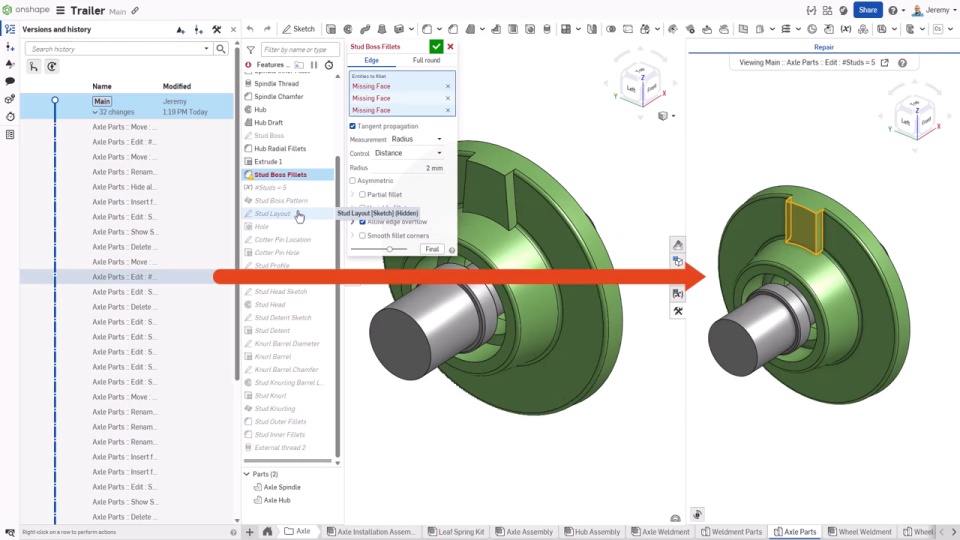
Onshape Repair Manager
07.10.2025
Repair Manager leverages Onshape’s cloud-native architecture to access a model’s entire design history at the CAD feature level to make repairs fast and easy.
Regarder
Debt by a Thousand Files: Unveiling the Hidden Costs of File-Based CAD Systems
01.02.2025
Explore how file-based CAD systems contribute to design debt – product development’s technical debt – and its impact on business outcomes. Then, learn how to improve efficiency through cloud-based solutions and modern data management practices.
Lire le blog
SOLIDWORKS Teams are Choosing a Better Way to Manage Design Data
Whenever I describe Onshape to anybody, I always say, ‘It's like the Google Docs of CAD,’ and they're instantly like, ‘Oh, that makes so much sense. Why haven't they (the CAD industry) done that already?’ ’’