
 Konto für Lernende erstellen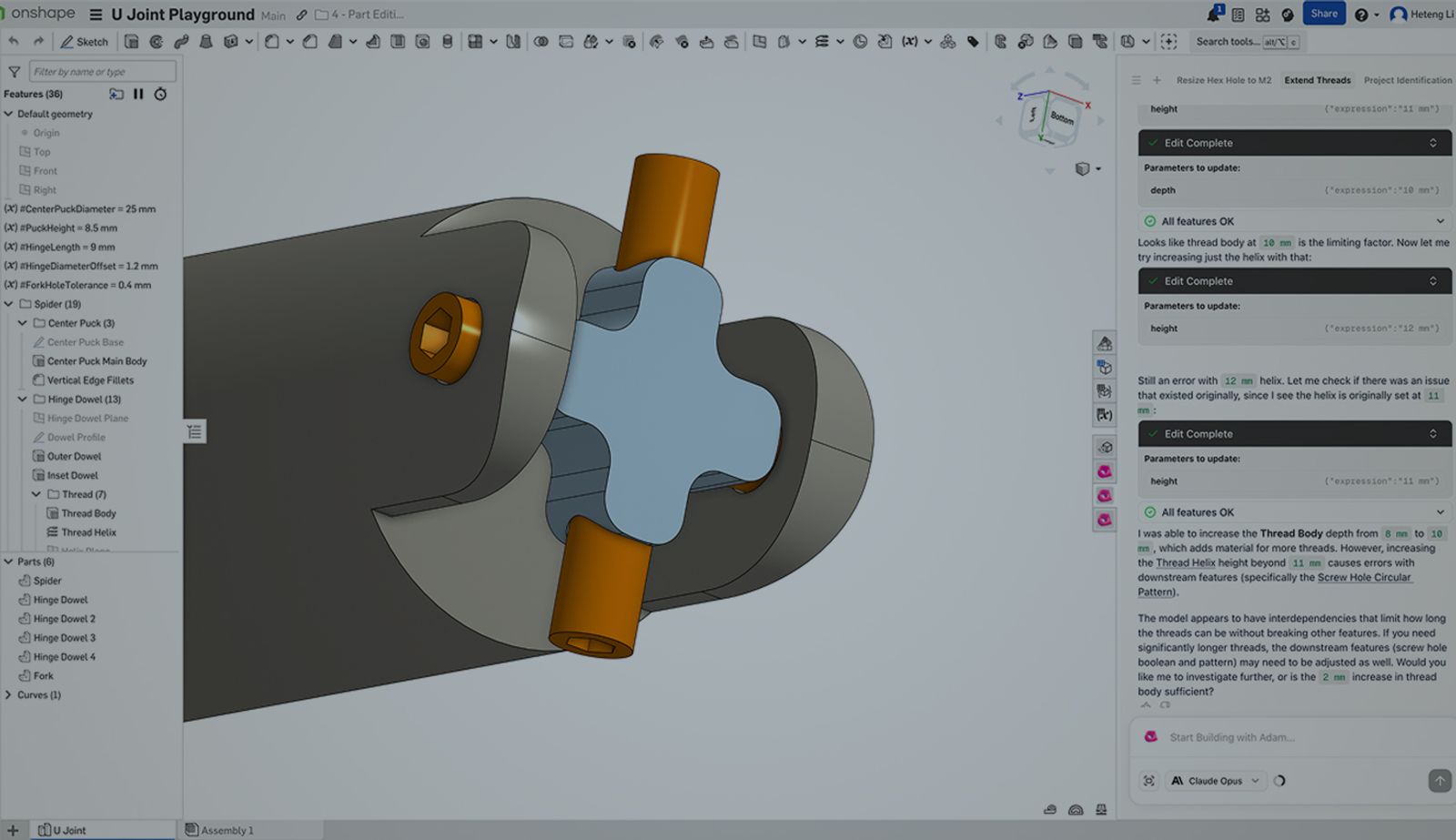

Summary
- Adam AI is now available on the Onshape App Store as a free open‑beta app, working inside Part Studios to help engineers clean up and optimize feature trees after modeling.
- The AI‑powered app automates repetitive modeling tasks, including organizing and renaming feature trees, merging redundant features, and parameterizing designs by extracting hardcoded values into variables.
- As a result, teams get clearer, more maintainable CAD models, making design changes faster, collaboration easier, and parametric intent easier to preserve as models evolve.
Parametric CAD models change over time, and keeping them clear and adaptable requires ongoing refinement. As designs evolve, feature names, dimensions, and structure often need adjustment to preserve design intent and make future edits easier.
Adam AI is a cloud-integrated app that works inside Onshape to support this cleanup work. Using plain‑language prompts, Adam AI interprets the structure of an existing model and applies targeted updates, such as reorganizing features, simplifying operations, or exposing key dimensions, while respecting the model’s underlying intent.
What Is Adam AI?
Adam is an AI-powered CAD co-pilot that operates inside Onshape Part Studios to optimize feature trees. Rather than generating new geometry, Adam AI works on existing models to improve structure, readability, and parametric control.
The application uses a prompt-driven interface that allows engineers to apply high-level cleanup and restructuring actions across a model. Adam AI focuses on three core areas of feature tree optimization:
- Extracting hardcoded numerical values into named variables
- Renaming features with descriptive, geometry-based names
- Consolidating redundant modeling operations
Adam AI addresses these areas to help bring clarity and consistency to feature trees without requiring engineers to manually edit features one by one.
Benefits for Onshape Users
Automating Repetitive Modeling Work
Adam AI is designed to handle the repetitive modeling tasks that often follow core design work. These include renaming features for clarity (because “Bracket Base Extrude” is much more helpful than “Extrude 18”), consolidating redundant features, and converting hardcoded values into shared variables. By automating this work, Adam AI reduces manual overhead while helping teams apply consistent structure across models.
Reduced Feature Tree Complexity
Over time, models may contain multiple extrudes, fillets, or other operations that can be combined. Adam AI identifies opportunities to consolidate these features, simplifying the overall structure of the feature tree and supporting cleaner rebuilds and downstream edits.
Editing Existing Geometry
Adam AI can handle basic edits to existing geometry in Onshape Part Studios. It can identify common features, such as fillets, and update their parameters, for example, changing radius values across a part in a single action. Engineers can describe changes in plain language, Adam AI helps teams iterate faster while preserving the structure and design intent of the original model.
Faster Iteration and Collaboration
Adam AI helps streamline design changes by organizing feature trees, extracting shared variables, and consolidating redundant features. Updates such as dimension or fillet changes are easier to apply and propagate consistently. Clearer structure and naming make models easier for teammates to review, modify, and reuse, supporting smoother iteration and collaboration over time.
Use Cases and Prompt Examples
Adam AI is designed for prompt-driven cleanup and restructuring tasks within Part Studios. Engineers can use natural language prompts to apply consistent changes across a model.
Common Use Cases
- Cleaning up feature trees before sharing models with teammates or partners
- Standardizing naming conventions across a Part Studio
- Preparing legacy or imported models for iteration
- Applying parametric changes across multiple features
- Simplifying complex feature trees after exploratory design work
Example Prompts
Adam AI operates through a prompt‑based interface within Onshape, allowing users to apply high‑level cleanup and restructuring actions without manually editing individual features. Example prompts include:
- “Rename all features in this Part Studio with descriptive names.”
- “Merge redundant extrude features to simplify the feature tree.”
- “Increase wall thickness from 2 mm to 3 mm.”
- “Add four mounting holes with a 5 mm diameter.”
- “Round sharp edges with a 2 mm fillet.”
- “Make the enclosure parametric by exposing width and height as variables.”
These prompts allow users to apply structured updates without manually editing individual features, supporting faster iteration and more consistent results.
Future-Looking AI-Integration
Adam’s vision is to help engineering teams ship hardware faster with AI.
“We’re building AI-native CAD workflows and inviting beta testers to shape what that becomes with us,” the Adam team said.
Onshape’s Expanding Partner Ecosystem
Onshape’s growing partner ecosystem is designed to extend core CAD workflows with specialized, integrated tools. The Onshape App Store allows third‑party applications to work alongside the design environment, adding focused capabilities without fragmenting the modeling experience.
For Adam AI, that model aligned closely with its goal of improving how engineers work with existing CAD models. Onshape’s cloud‑native architecture and API‑driven platform make it possible for applications like Adam AI to operate directly on Part Studios, applying structured updates to feature trees and parameters while preserving design intent. The result is a tool that feels additive rather than disruptive, augmenting Onshape’s core capabilities by automating repetitive modeling and cleanup tasks that teams already perform.
Interested in integrating your product with Onshape? Reach out to onshape-developer-relations@ptc.com to get started.
How to Start Using Adam AI
Adam AI is available as a free open beta through the Onshape App Store.
To get started:
- Open the Onshape App Store
- Navigate to the Design and Documentation category
- Find Adam Beta and add it to your workspace
- Launch Adam from within a Part Studio
- Use prompts to organize, rename, and parameterize your feature tree
The Adam team is actively collecting user feedback during the open beta to guide future development and prioritize new capabilities.
To learn more, visit the Adam AI website or explore Adam in the Onshape App Store.
Try Adam AI
Adam is an AI-powered CAD co-pilot that works directly inside Onshape to help engineers design more efficiently using natural language.
Latest Content

- Fallstudie
- Aviation, Aerospace & Defense
Dufour Aerospace Accelerates Critical Cargo Drone Delivery with PTC’s Onshape and Arena
02.11.2026 Mehr Infos
- Blog
- News from Onshape @ PTC
- Integrationen
Onshape App Store Adds Adam AI, an AI-Powered Design Co-Pilot
03.04.2026 Mehr Infos
- Blog
- Evaluating Onshape
- Zusammenarbeit
How Onshape Fixes the Broken Promise of Model-Based Definition
02.26.2026 Mehr Infos
- Blog
- Kunden und Fallstudien
- Automotive & Transportation
Powering Heavy-Duty Innovation: How Edison Motors Builds Next-Gen Hybrid Trucks with Onshape
02.26.2026 Mehr Infos