
 Konto für Lernende erstellen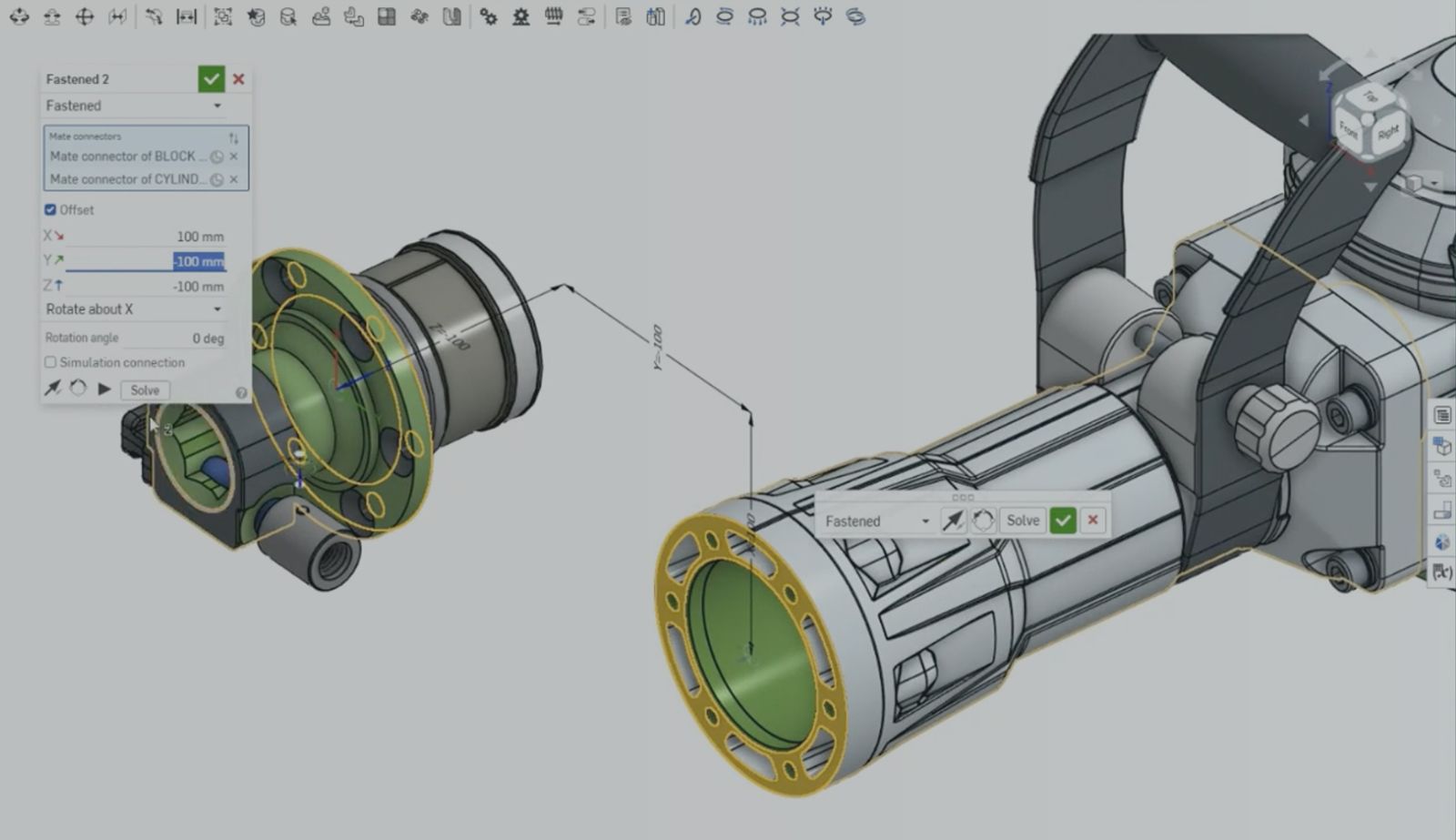
00:00
Summary
- Onshape is built to handle large, complex assemblies without the usual slowdown
- Composite parts, Group, and Replicate cut mate count as parts scale into the thousands
- The payoff is professional-grade assemblies that stay fast, not just simple ones
Onshape assemblies, like any CAD functionality, can generate sub-optimal performance when used incorrectly. In the case of assemblies, the number of mates that constrain degrees of freedom (DOFs) has to be managed for a smoother experience.
Onshape provides specific tools for managing the number of mates. Composite parts, group, and replicate, each strip out redundant mates before the assembly gets heavy. Part count can climb into the thousands, but with proper usage, it’s not a proportional climb in what the software actually has to compute, store, and solve.
Let’s break down what’s actually happening underneath that smoothness.
Group Clusters Without a Mate Per Part
Not everything in an assembly needs its own individual mate. Plenty of components are meant to stay fixed relative to one another, like a motor’s housing, windings, and magnet casing, while a smaller number need to move freely, like the shaft and fan spinning inside it.
Instead of mating each rigid component to its neighbor one at a time, Onshape’s Group command lets you select every component that should move together and lock that relationship in a single step. The components you exclude stay untouched and fully mobile. One relationship replaces what could have been a dozen individual mates, and it stays immediately clear, both to you and to anyone else opening the document later, which components are grouped and which aren’t.
Composite Parts, Collapsing Complexity at the Source
Every assembly has components that can be modeled as a single part. A standard ball bearing, for example, might be made up of an inner race, outer race, cage, and a dozen or more individual balls. In most CAD workflows, that’s a dozen plus parts that need to be brought into the assembly and mated relative to one another, every single time you use one.
Onshape handles this with Composite parts, a feature that combines all those individual parts into a single, unified part. The internal geometry stays fully modeled underneath, but the assembly only ever sees and mates one part. Multiply that across every bearing, every hardware assembly, every purchased component in a large design, and you’ve eliminated hundreds of unnecessary mates before you’ve placed a single one.
Further, composite parts simplify the BOM, tracking the entire composite part as one. This is especially useful for purchased parts, such as bearings, that need to be tracked as a single part for purchasing decisions. Mate connectors can also be persisted with the composite part so that new mate connectors are not needed for every instance of the composite part.
Replicate, Scaling Hardware Without Scaling Features
A single cover plate might need four screws. A housing might need eight. A full assembly can easily carry hundreds of fasteners, and modeling each one as its own mate, one at a time, is exactly the kind of manual, repetitive work that turns a fast assembly into a slow one.
Onshape’s Replicate tool solves this by taking an existing, correctly mated fastener and matching that same mate structure across every qualifying edge, plane, or face you select, all in a single feature. Instead of hundreds of individual mates, you get one feature that represents all of them. And because replicate can match against an edge, a full plane, a specific face, or every identical face on a part, it scales cleanly whether you need four fasteners or 40.
A related note on placement, the same underlying logic of doing repetitive work once instead of once per instance shows up in how components get placed in the first place. Snap mode, combined with pre-built mate connectors, lets you drop in a whole set of matching components, five bearings, for example, in rapid succession without hunting for geometry each time.
Cloud-Native Tools Are Ready for Large Models
Individually, these tools are massive time-savers. But when used together, they create a compounding effect that fundamentally changes how your CAD system processes large models.
A common question engineers ask is whether cloud-native tools will struggle with heavy assemblies compared to traditional desktop software. In reality, CAD performance issues usually stem from a high volume of unmanaged degrees of freedom and redundant mate calculations, regardless of the platform.
By proactively stripping out the computational dead weight, Onshape ensures that as your assembly parts and components scale up, your performance doesn’t slow down.
Das Onshape Discovery-Programm
Erfahren Sie, wie qualifizierte CAD-Experten Onshape Professional bis zu 6 Monate lang nutzen können — kostenlos!
Useful Tech Tips
Neuester Inhalt
- Blog
- Experte werden
- Baugruppen
Built to Scale: Why Large Assemblies Don’t Slow Down in Onshape
07.16.2026 Mehr Infos- Blog
- News from Onshape @ PTC
- Artificial Intelligence
Onshape Labs: AI in CAD Guided by Designers, Driven by Innovation
07.15.2026 Mehr Infos- Blog
- Evaluating Onshape
- Datenverwaltung
- Zusammenarbeit
- Artificial Intelligence
How the Most Underrated CAD Feature Improves Design Workflows
07.09.2026 Mehr Infos