
 Konto für Lernende erstellen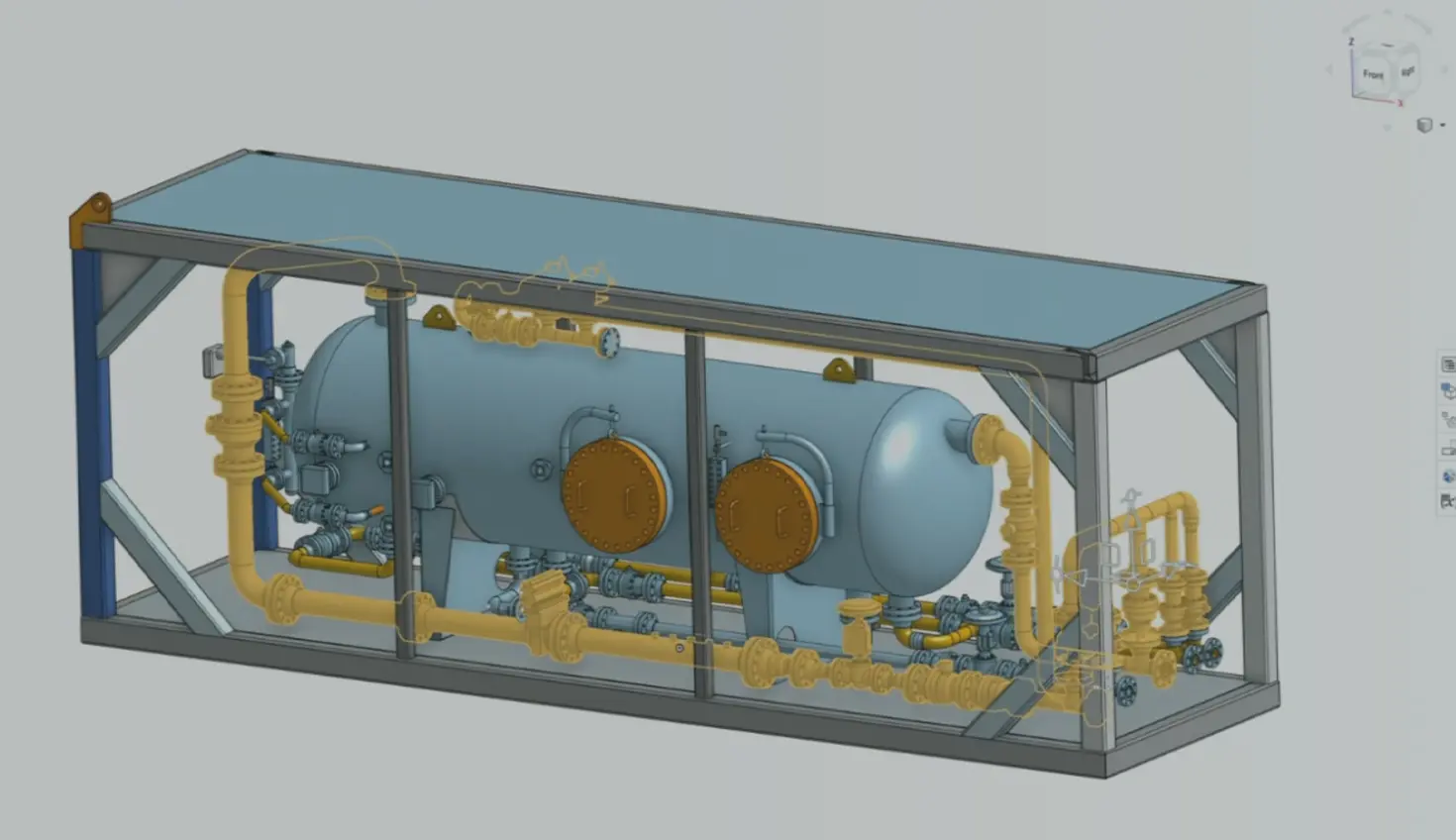
06:43
Summary
Cloud-native CAD removed the friction points from file-based software, created a streamlined way to collaborate, and provided a foundation for AI development in product design.
Every major shift in CAD software has been a response to friction, one limitation solved, only to reveal the next. Manual drafting gave way to parametric modeling, which needed hardware that eventually became standard. Software built around individual files brought its own friction: copies out of sync, versions nobody could confidently call current.
Moving CAD to the cloud solved that, but access still wasn’t the same as real collaboration, teams could reach the same design from anywhere yet still worked through it one at a time. Each shift looks, in hindsight, less like a clean fix and more like one constraint trading places with the next.
This is where cloud-native, database-driven CAD earns its name. Onshape’s architecture was built to solve the friction still baked into daily collaboration. It’s also primed to tackle the next limitation: Whether that same well-structured data is ready for a new kind of collaborator, an AI agent.
Today’s CAD needs to address the problems left behind by file-based systems, which still slow down collaboration, and what stands between engineering data and AI.
Onshape’s architecture was built to address all friction areas.
Undoing What File-Based CAD Left Behind
Before a team can move quickly, it first has to stop paying for problems that file-based CAD created and never fully solved. Installations, license servers, local crashes, and scattered files are structural side effects of software designed to run on individual machines rather than in a shared, managed environment.
Browser-Based Access, Anywhere
Onshape runs entirely in a browser, with no installation and no dependency on a specific operating system. With a completely cloud-native, multi-tenant architecture, a design session opened on a laptop can be picked up mid-edit on a tablet or phone with no file transfer or sync to the cloud. Multiple users can collaborate on the same CAD data simultaneously.
No Local Hardware, No Local Failure
Onshape runs as a set of microservices on AWS infrastructure rather than as a monolithic application installed on a workstation. CAD modeling, rendering, and simulation jobs are offloaded to compute resources in the cloud, which means a heavy workload, such as simulation or rendering, doesn’t lock up a designer’s machine or put it at risk of crashing mid-operation. Document state is persisted continuously to the server as edits are made, rather than relying on a manual save, so there’s no scenario where unsaved local work is lost to an application crash.
One Document, Not a Folder of File Copies
Onshape documents can reference other documents. When a Part Studio or sub-assembly is referenced elsewhere, that reference remains as a stable snapshot. If the source document is updated, dependent documents are not silently changed. Instead, the system flags that a newer version exists and leaves the decision of when, and whether, to update the referencing document to the user. This reference model is what eliminates the instability typical of file-based CAD references.
Solving the Collaboration Friction Teams Feel Today
Even teams that have moved past legacy file management still lose time to a different kind of friction, one that has less to do with old software and more to do with how people coordinate on a single, evolving design in real time.
Real-Time, Multi-User Editing
Onshape uses a multi-tenant database architecture that allows more than one user to operate on the same document simultaneously, with each user’s edits synchronized to the others in real time. This removes the file-locking model that most CAD systems still rely on, where a document checked out by one user is inaccessible to others until it’s checked back in. This also extends to reviews, so a model opened on a phone or tablet by one user can follow exactly what another user is doing, including camera orientation in real time. Comments can be attached directly to specific geometry rather than routed through a separate email or messaging thread.
Git-Inspired Version Control
Onshape’s version control is modeled on distributed version control systems like Git, applied to CAD history. Every edit generates a microversion automatically, and users can create named versions as stable checkpoints. From any point in that history, a user can create a branch, an independent workspace that starts as an exact copy of a given version but doesn't affect the main workspace until it's explicitly merged back in. Onshape also provides a visual Compare tool that overlays two versions or branches of an assembly and highlights geometric differences directly.
Non-Blocking Release Management
Release management in Onshape is decoupled from the editing workflow. A document can be submitted into a release process, complete with custom approval chains for specific users or teams, without locking the underlying workspace. Designers can continue working in branches or in the main workspace while a release is pending approval. Before a release can be finalized, Onshape runs automated checks against the associated drawings, for example, flagging dangling or out-of-date dimensions, which catches downstream errors before they reach a manufacturing package rather than after.
Preparing CAD Data for What’s Next
The next collaborator on an engineering team might not be human. Whether that collaborator turns out to be useful depends on whether the underlying CAD data is structured well enough for it to act on, and that isn’t something most CAD platforms can claim.
An Open API and Open Scripting Language
Onshape exposes a documented, versioned REST API covering document management, part studio, and assembly operations, and metadata, which allows external applications and scripts to interact with CAD data programmatically rather than only through the UI.
Alongside the API, Onshape’s parametric modeling engine is built using FeatureScript, a custom scripting language that is open-sourced and fully documented, including the source code for Onshape’s own built-in features. Because FeatureScript is a readable, text-based language rather than a compiled binary or an opaque macro format, it can be parsed, learned, and generated by a language model in the same way any other well-documented programming language can.
AI-Assisted Design via Claude and MCP
Onshape can be connected to Claude through a Model Context Protocol (MCP) server, which exposes Onshape’s API and FeatureScript documentation as tools an AI agent can call directly.
In practice, this allows an agent to read engineering references, generate FeatureScript code for a custom feature, and test that code against a live document, iterating without a human manually copying code back and forth.
In one demonstrated workflow, shown below, this process produced a fully parametric shell-and-tube heat exchanger, including saddle-support geometry calculated using the Zick design method, correctly named and organized bodies suitable for downstream manufacturing documentation, an automatically generated weld schedule, and drawings that updated as parameters changed. The full model, including multiple custom features, was built in about a day.
The output of a workflow like this still requires engineering review. An AI-generated model is a fast, well-informed starting point built against documented standards, not a substitute for domain expertise or design validation.
Solutions Enabled by the Cloud
File-based CAD’s friction comes from infrastructure built for individual machines rather than shared teams. Collaboration friction comes from coordination gaps that persist even in modern tools, in scheduling, in version confusion, in approvals that sit untouched. AI-readiness friction is only just becoming visible to most engineering leaders, and it comes down to whether CAD data is structured cleanly enough for a machine to act on it safely.
These are different problems being addressed by the same underlying architectural decision – a connected, cloud-native system with a single source of truth, rather than a patchwork of local files, plugins, and disconnected tools.
Das Onshape Discovery-Programm
Erfahren Sie, wie qualifizierte CAD-Experten Onshape Professional bis zu 6 Monate lang nutzen können — kostenlos!
Neuester Inhalt
- Blog
- News from Onshape @ PTC
- Artificial Intelligence
- Benutzerdefinierte Features
From Onshape Labs, the FeatureScript MCP Server: The Fastest Path to AI-Driven Design
08.11.2026 Mehr Infos- Blog
- Experte werden
- Datenverwaltung
15 Dinge, die Sie vor dem Import von CAD-Dateien in Onshape wissen sollten
08.06.2026 Mehr Infos- Blog
- Evaluating Onshape
- Model Based Definition
- PCB Studio
- Rendering
- Simulation
- Integrationen
Onshape Features That Keep Your Design Data Connected: August 2026 Highlights
08.05.2026 Mehr Infos