
 Create a Student Account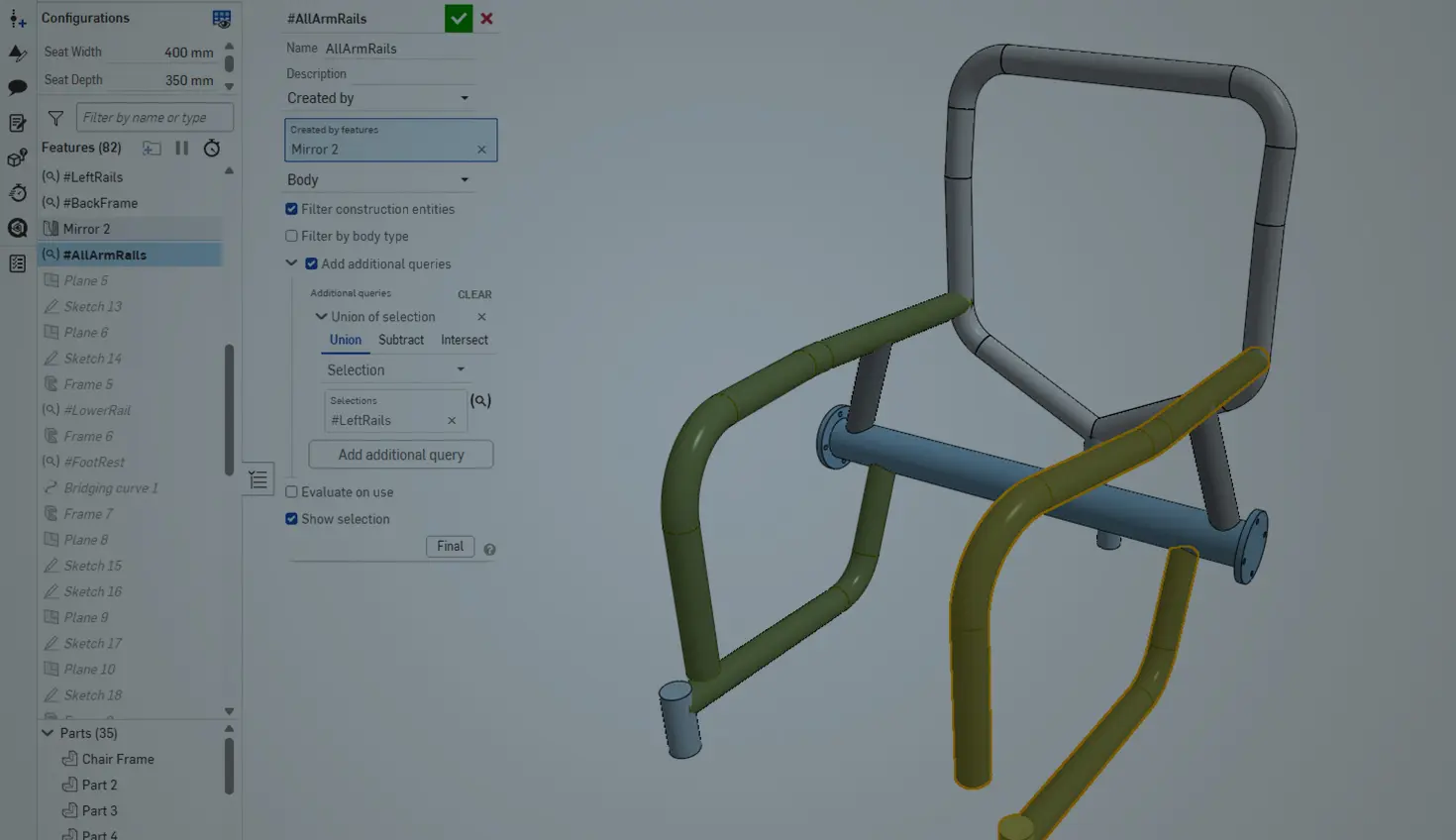
02:56
The addition of Query variable to the Onshape feature library has given deeper control to selection tools in almost every aspect of part creation, with one of the biggest benefactors being the Frame feature for extrusion profile and weldment design.
“Created By” in Query Variable
Need to mirror a handful of frames without individually selecting them? No problem at all!
Start with the “Created by” selection in Query variable to select members created by a certain feature and group them all together.
Once you have your query created, you can call it in the Mirror feature directly. This pulls in all the components within the scope of the query to this single feature rather than selecting all the members manually.
This selection is parametric, so if additional frames are created by this same feature after a design change, they are included in the new, updated mirror.
Then it comes time to trim those components. Trimming can be performed during the frame creation process; however, sometimes you may require more advanced trimming capabilities that can only be found in the hierarchical Frame Trim feature.
Traditionally, during that trim, you need to manually select each frame member that is part of a frame group. The “Created by” option comes in handy again, this time by grouping frame sets together into a single variable defined by the feature that created them, making it significantly easier to select and reorder groups of frames to be trimmed.
“All Solid Bodies” in Query Variable
Within the Cut list feature, there is an option to “Select all frames.” This works great for quickly selecting all frames and adding other members to the cut list, but how do you get similar functionality outside the Cut list feature? Query variable, of course.
Part of the configuration capabilities of this sports wheelchair, shown above and below, is the ability to change the color of all the frames at once using a custom feature, and this is where Query variable comes in.
The “All solid bodies” selection option automatically detects all solid bodies within your Part Studio, similar to the “Select all frames” scope from Cut list. This works great, but what about the seat? That should not be included.
For cases like this, Query variable lets you nest additional selection logic within the same variable. If I just want this Query variable to evaluate to only frame members, I add a new query that subtracts the selected parts from the query, which in this case is the Seat part.
After this selection set is created, if the original wireframe that created all these frames changes, Query variable parametrically updates to ensure that all the downstream features remain intact.
“Matching” in Query Variable
It isn’t just robustness that Query variable provides you, but also speed. The horizontal members for this standing desk, shown below, require end caps, and while only a few are needed, it's easy to see how this requirement can quickly escalate at a larger scale, requiring many selections.
Query variable’s option to automatically select matching faces lets you quickly select one instance of a certain face that you need, and then applies end caps to all the other matching faces, cutting down the number of clicks by half. Even if the frame profile of these weldments changes, the end caps also update parametrically.
These are just a few examples of the Query variable feature’s uses, and its true power lies in the numerous ways to apply these selections.
Try it out for yourself and see where else it can be useful!
Friends Don’t Let Friends Use Old CAD!
Know a colleague who could benefit from our cloud-native, fully-featured collaborative design platform?
Latest Content
- Blog
- Evaluating Onshape
- Bill of Materials
- Branching & Merging
- Data Management
- Release Management
CAD and PDM Capabilities That Speed Up Every ECO
09.17.2026 learn more- Blog
- Evaluating Onshape
- Education
Intro to Engineering: A Curriculum Built for Your First-Year Course
09.15.2026 learn more- Blog
- Artificial Intelligence
- Custom Features
AI Tokens in CAD: What Engineers Using LLMs and Coding Agents Need to Know
09.10.2026 learn more