
 Create a Student Account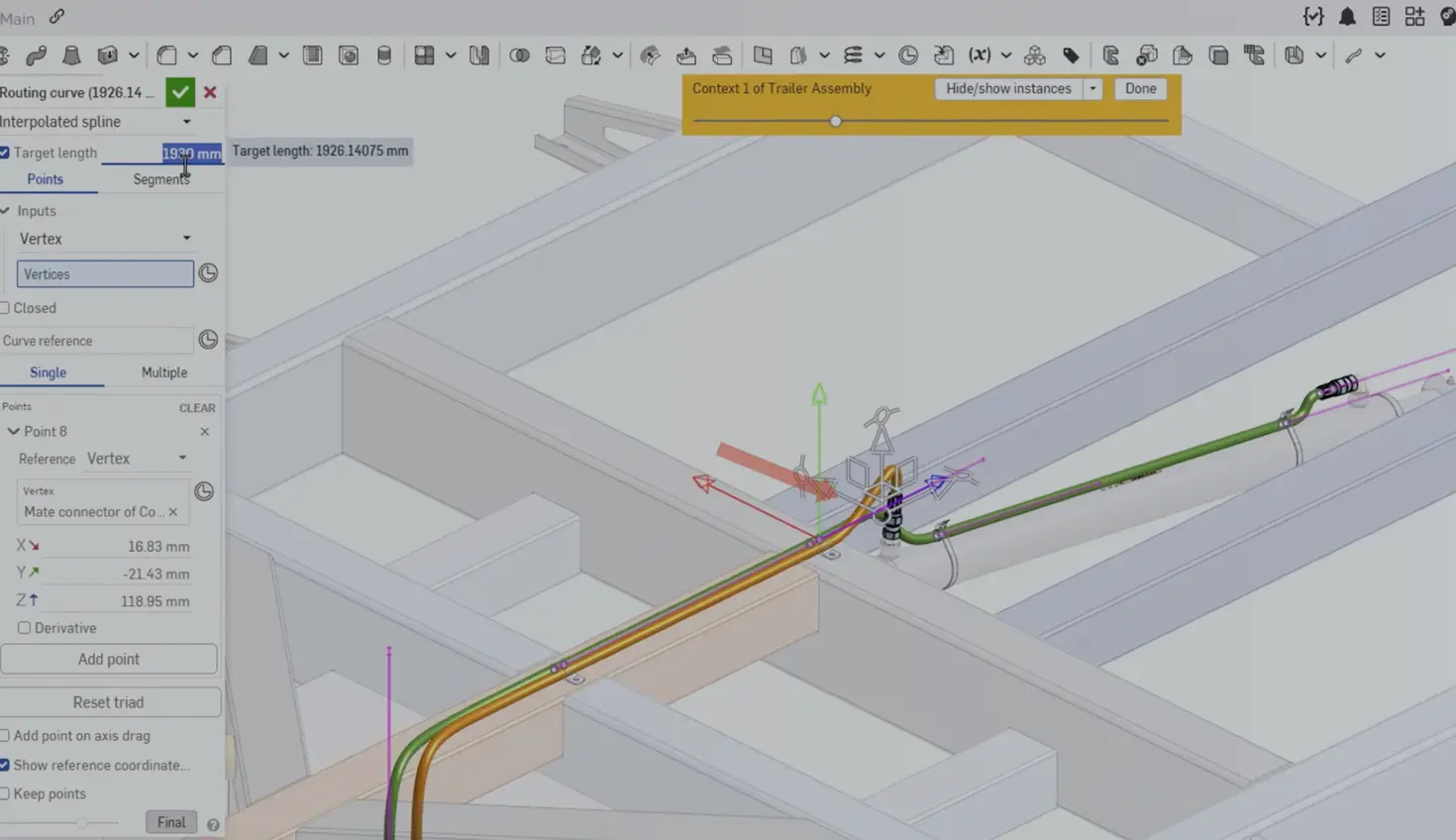
03:28
Quick Summary
Onshape 1.216 brings routing curve length control, persistent measure, sweep twist/scale, faulty part suppression, arc length dims, axis auxiliary views, fit tolerance standards, and mobile routing curves.
CAD Improvements
Specify Length of Routing Curve
Onshape has introduced a new feature for routing curves that allows users to specify a desired length for spline curves used in products such as hoses. This manufacturing-focused enhancement automatically adjusts the curve length to match the specified value, eliminating the need for complex calculations or manual adjustments. The feature is particularly useful for designing products that need to meet specific length requirements for manufacturing or purchasing purposes. See the Routing Curve topic in the Help Documentation for more information.
Persistent Measure
Measurement visualization has been enhanced to remain visible on screen and update in real time during interaction, providing a clearer, more consistent view without requiring rebuilds.
Sweep, Twist, & Scale for Profiles Not Coincident to Path
Onshape now supports twist and scale for sweep profiles that are not coincident to the sweep path. This enhancement opens up new design possibilities and gives users more creative freedom when incorporating complex sweep operations into their CAD models.
Ignore Faulty Parts
You can now right-click and ignore faulty parts to move them from an error to a warning state, allowing releases to proceed while maintaining clear visual indicators across Part Studios, assemblies, and drawings.
Drawings Improvements
Arc Length Dimension
Arc length dimensions present a new way to define curved geometry in your drawings in Onshape.
Attach Comment to Sketch Dimensions
This release introduces the ability to tag comments directly to sketch dimensions. This makes it easier to communicate your thoughts and ideas with the rest of your team by allowing you to target specific dimensions.
Axis Auxiliary Views
Onshape has released a new feature that allows users to create auxiliary views along a cylindrical axis, in addition to previous options. This enhancement enables engineers to capture manufacturing details at non-orthogonal angles by selecting a circular edge to use its axis as the direction for the auxiliary view. This new capability is particularly valuable for complex compound angled geometry, reducing the need for multiple projections and auxiliary views to capture relevant information. See the Auxiliary View topic in the Help documentation for more information.
Hole and Shaft Fit Tolerance Standard Selection
Onshape now allows you to specify a standard different from the drawing standard when defining hole or shaft fit tolerances. This enables users to filter tolerances regardless of the standard for their specific manufacturing needs.
Replicate Chamfer Dimension
Replicate Annotations (Beta) now supports replicating chamfer annotations.
Render Studio Improvements
Replace Reference
Render Studio now lets you replace references for top-level Part Studios, assemblies, or parts, while preserving your scene structure and automatically updating all associated data for faster configuration-based rendering.
Enterprise Improvements
Folder and Project Filtering
Onshape Enterprise users will now find a filter in the Documents view for folders and projects. This makes it easier to find the documents you want to work on and enables you to focus on the specific task at hand.
Mobile Improvements
Routing Curve Tool in iOS and Android
Routing curves for developing 3D paths, routes, and curves are now built into the mobile Onshape app. A triad manipulator is also available to edit the positions of each point on the path.
Show and Reset Scale in AR View
AR View now shows a scale factor above the model during pinching gestures, with the option to reset to full scale.
Please take a moment to try out these new features and improvements, and leave your comments in the Onshape Forums post. For a detailed list of all the changes in this update, please see the changelog.
Remember: The updates listed here are now live for all users when creating new documents. Over the next few days, these features will also be available in documents created before this update. Mobile app interface updates are available via the Apple App Store or Google Play Store and are released in the days following the update.
Onshape Events
Register for real-time and on-demand events hosted by Onshape experts.
Latest Content
- Blog
- Evaluating Onshape
- Data Management
- Drawings
- Artificial Intelligence
How Onshape is Redefining the Manufacturing Handoff with MBD and AI
09.24.2026 learn more- Blog
- Data Management
- Integrations
- Government (US)
With Quarter20 and Onshape, Database-Driven Documentation from Design to Production
09.23.2026 learn more- Blog
- Evaluating Onshape
- Bill of Materials
- Branching & Merging
- Data Management
- Release Management
CAD and PDM Capabilities That Speed Up Every ECO
09.17.2026 learn more