
 Create a Student Account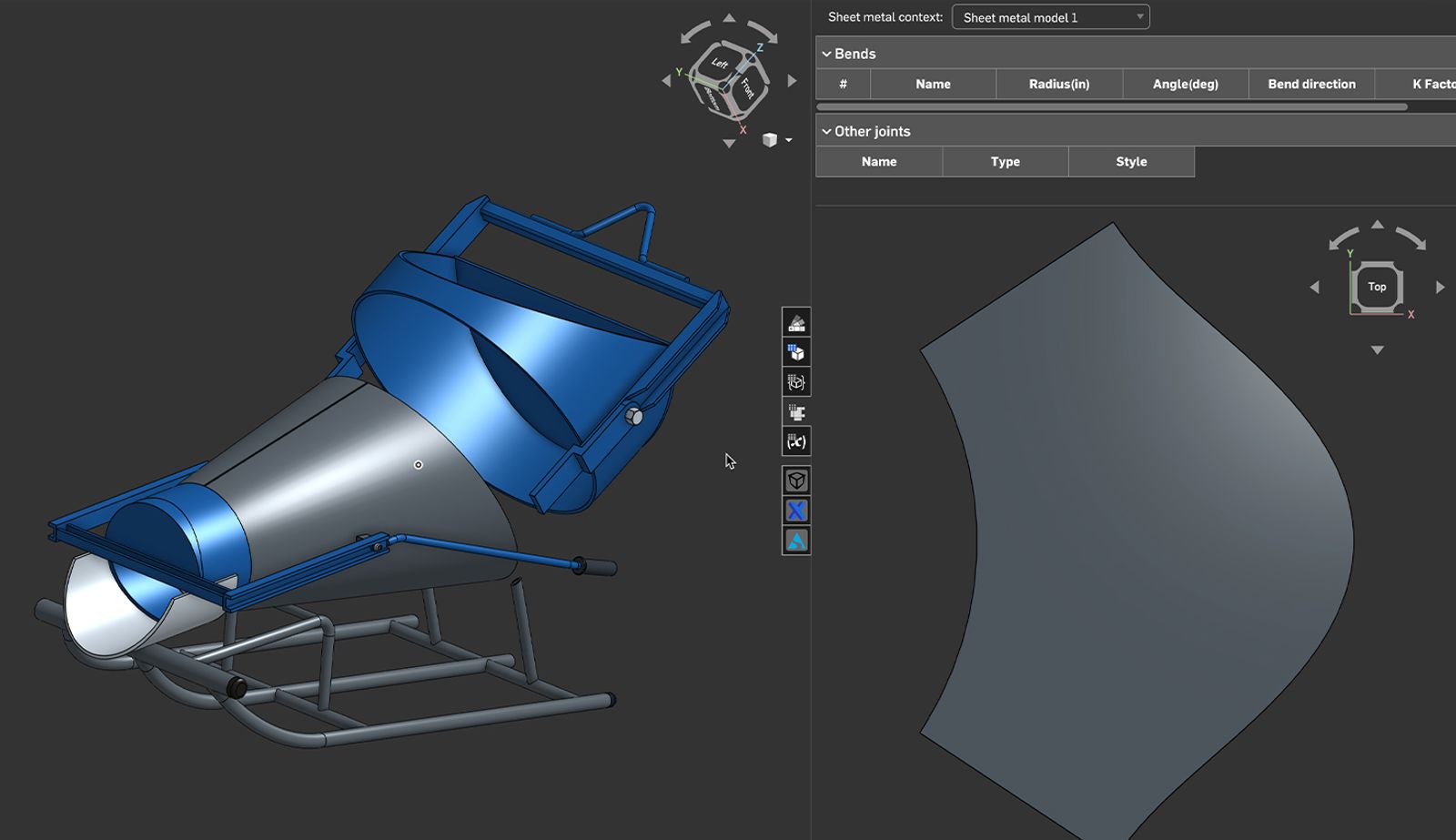
02:12
Anyone making ductwork, hoppers, concrete chutes, or funnels will use Onshape’s Sheet Metal features, especially to create cylindrical/rolled and conical sheet metal parts. This was one of our most requested sheet metal features.
If you want to learn more or are new to working with sheet metal models, this Tech Tip is for you.
What Makes Onshape’s Sheet Metal Tools Unique?
One of the standout features of Onshape’s sheet metal modeling environment is its simultaneous modeling capability. You can design both folded and flat representations of your part at the same time. There is no need to switch between modes or wait for a rebuild. As you make changes to the folded model, the flat pattern updates instantly, and vice versa.
This is especially powerful when working with conical or cylindrical parts, where accurate flat patterns are critical for fabrication. You can see the impact of your design decisions in real time, reducing errors and speeding up the design-to-manufacture process.
One Model, Multiple Representations
Onshape’s sheet metal tools give you three synchronized views of your part:
- Folded Model: The 3D representation of the final part.
- Flat View: The unrolled sheet metal pattern.
- Table View: A tabular breakdown of bend lines, angles, and radii.
This triad of views is especially helpful when working with rolled parts like cones and cylinders. You can validate the geometry, check bend allowances, and ensure manufacturability, all without leaving the Part Studio.
Feature Flexibility and Precise Flat Patterns
Onshape’s Sheet Metal tools are designed to be versatile, allowing you to create parts from almost any geometry using the familiar Convert, Extrude, and Thicken options. And now, with support for cylindrical and conical faces, modeling complex rolled parts, like sheet metal cones, is seamless, with no extra steps required.
There are three primary methods for creating sheet metal parts when initiating a sheet metal model feature:
- Convert: Works with both cylindrical and conical geometry
- Thicken: Also supports cylindrical and conical shapes
- Extrude: Limited to cylindrical parts only
For conical parts, both Convert and Thicken work seamlessly, whether you are starting from a solid or a surface. Select the required faces, and Onshape generates a precise flat pattern, ready for fabrication.
This means fewer workarounds, more accurate results, and a smoother workflow, especially for parts that need to be rolled and welded, like ducts, hoppers, chutes, funnels, etc.
Learn More About Onshape’s Simultaneous Sheet Metal Modeling
You can find out more in our dedicated Learning Center course about Simultaneous Sheet Metal.
The Onshape Learning Center
Take self-paced courses, read articles, or sign up for an instructor-led training session.
Latest Content
- Blog
- Becoming an Expert
- Assemblies
Built to Scale: Why Large Assemblies Don’t Slow Down in Onshape
07.16.2026 learn more- Blog
- News from Onshape @ PTC
- Artificial Intelligence
Onshape Labs: AI in CAD Guided by Designers, Driven by Innovation
07.15.2026 learn more- Blog
- Evaluating Onshape
- Data Management
- Collaboration
- Artificial Intelligence
How the Most Underrated CAD Feature Improves Design Workflows
07.09.2026 learn more