
 Create a Student Account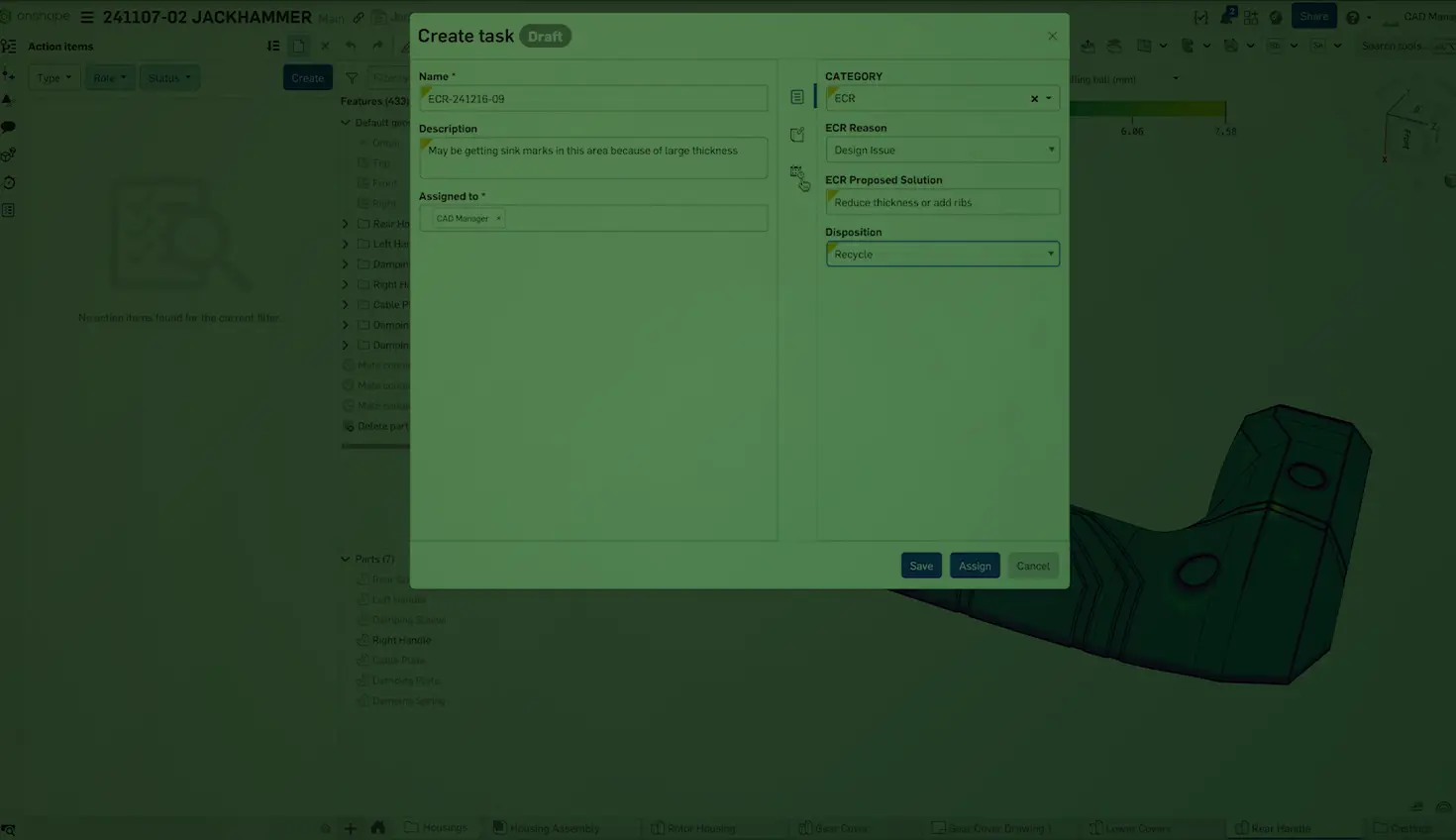
1:47
Gone are the days of one-size-fits-all task structures. Onshape Professional and Enterprise plans provide the flexibility to define custom fields and naming conventions that reflect the distinct processes and requirements of your organization. This level of personalization ensures that your task management system becomes an extension of your company's identity and operational excellence.
An example of a custom task designed to handle an Engineering Change Request (ECO) process with custom fields that are searchable for the reason and disposition of inventory.
Creating an ECO Task Workflow
To create your own custom Task management interface, you will need the correct administrative rights in your Onshape account. In the Company or Enterprise Settings screen, you can create Custom Properties with a custom Category.
- Create a custom category with the type “Tasks”
- Create custom properties with the appropriate fields you wish to monitor for your design reviews and change orders. Make sure to set the appropriate Task Category for the Custom Property
- Make sure to publish the newly created properties to make them available for use across your organization.
- View the fields that you wish to see in your Action Items screen for future reference. These filters can help define which tasks are assigned to which user, their status, and any other custom information that you have set up.
The Action Items Summary dashboard, only available with Onshape Enterprise, allows organizations to quickly understand the team and engineer task workloads to optimize results.
Whether you need to track specific quality metrics, incorporate specialized terminology, or streamline approvals based on your internal workflows, Onshape empowers you to shape the task experience to your exact specifications. By embracing this level of customization, you can drive greater efficiency, enhance collaboration, and maintain the precision that your quality management demands.
Check out our other Tech Tips about task management in Onshape:
- Tech Tip: Maximizing Onshape’s General Tasks
- Tech Tip: Assigning Tasks in Comments
- Tech Tip: Optimizing Onshape Action Items
- Tech Tip: How to Delegate Approvals and Task Assignments in Onshape
Then, head to the Learning Center to hone your design skills and to get the most out of Onshape features and tools.
The Onshape Learning Center
Take self-paced courses, read articles, or sign up for an instructor-led training session.
Latest Content
- Blog
- Evaluating Onshape
- Artificial Intelligence
- Custom Features
5 Ways Teams Can Leverage the Onshape FeatureScript MCP Server
08.20.2026 learn more- Blog
- News from Onshape @ PTC
- Artificial Intelligence
- Custom Features
From Onshape Labs, the FeatureScript MCP Server: The Fastest Path to AI-Driven Design
08.11.2026 learn more- Blog
- Becoming an Expert
- Data Management
15 Things to Know Before Importing CAD Files into Onshape
08.06.2026 learn more