
 Create a Student Account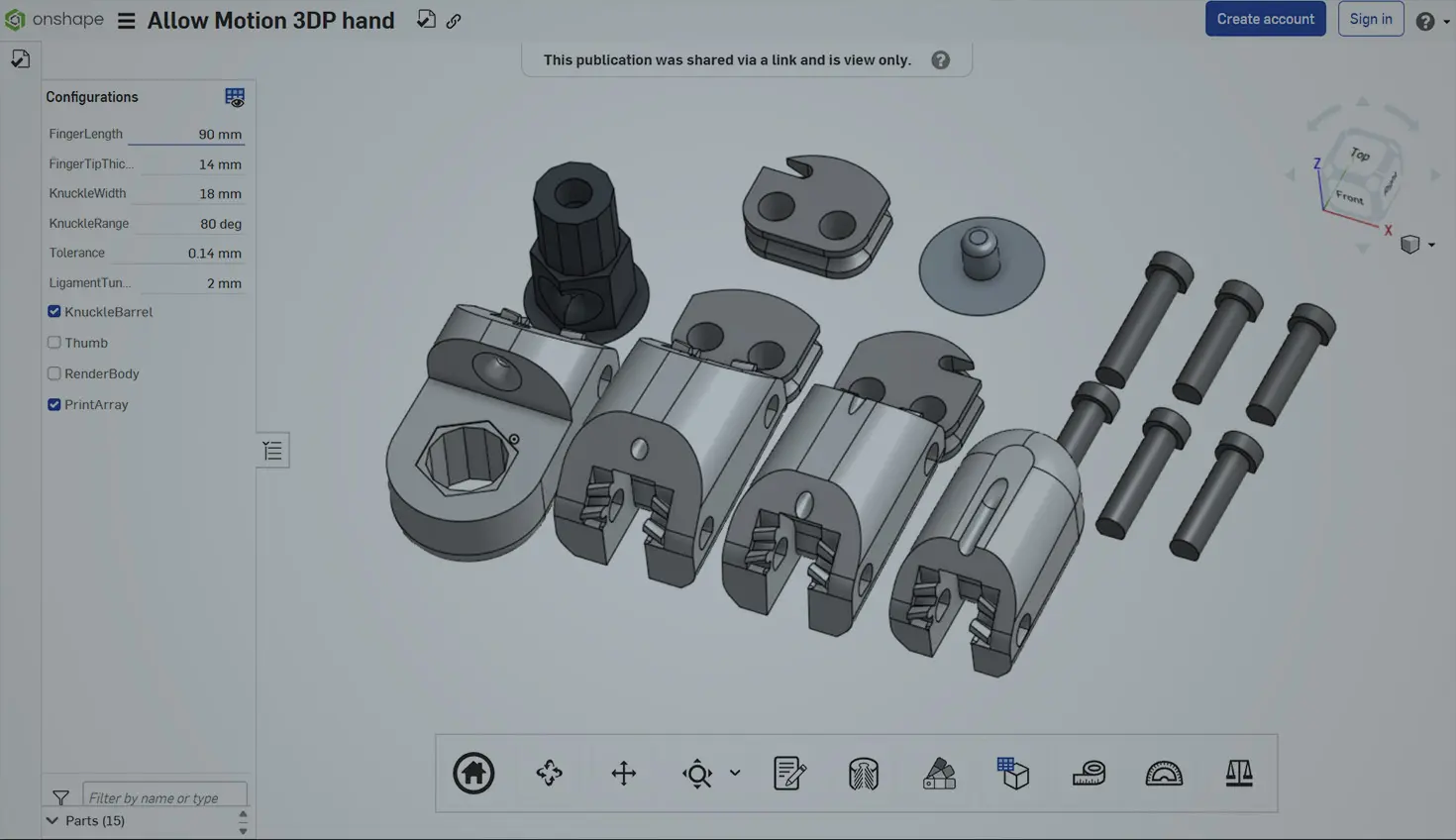
09:46
Hardware startup founders often pour their energy into perfecting CAD models of their products. But those same Onshape models aren’t just for engineering – they can be marketing and sales gold. By repurposing your Onshape CAD models, you can create compelling visuals and interactive experiences that help you pitch, market, and sell your product.
In this guest post by Zachary Ronski, we’ll explore five tactical (and friendly, non-techy) strategies to turn your engineering assets into powerful marketing content.
First things first, a quick intro: I’m Zach, founder of Fello Agency. We’re a creative shop and commercialization partner that works with some of the most innovative hardware and deep-tech companies out there – helping them turn complex engineering into marketing that actually connects.
I started Fello after realizing we wanted to work with the most advanced tech teams, from quantum computing to defense, and saw that many of them were building incredible things but struggling to tell their story. We help founders like you turn CAD files, prototypes, and big ideas into clean branding, sharp content, and campaigns that move the needle.
1. Export CAD Renders for Landing Pages and Pitch Decks
High-quality images of your product can make your website and pitch materials shine. Instead of waiting for a manufactured prototype and a photoshoot, use your Onshape model to produce photorealistic renders. Onshape’s built-in Render Studio (available in Professional and Enterprise plans) lets you generate life-like images of your design – complete with realistic materials, lighting, and backgrounds. This means you can present professional-quality visuals to investors and customers without a physical prototype .
For a startup founder, that’s a huge win. Imagine your product rendered in a sleek environment on your landing page or in an investor slide deck – it communicates polish and vision. Focus on a clean angle that highlights your product’s best features. You might export a few different angles or close-ups and use them in your website banner, product feature sections, or the cover slide of your pitch deck. Leveraging visuals helps bring an idea to life and convince stakeholders of your concept’s merit. In short, let your CAD model speak 1,000 words by turning it into eye-catching imagery.
Friendly Tip: Onshape allows you to save a PNG image of your model via the Print function or with its rendering tools. No fancy GPU needed – Onshape’s cloud rendering handles the heavy lifting.
2. Use Exploded Views for Product Explainers
Sometimes your audience needs to see inside the product to appreciate it. This is where an exploded view comes in handy. An exploded view takes your assembly and pulls the components apart slightly, showing how everything fits together. It’s fantastic for explainers because it visually communicates a complex product in seconds – no dense technical description required. In fact, animated 3D exploded views have been called the ultimate tool for showing what’s inside a design, making it easy to explain how a product works.
For example, if you’re pitching a hardware device, include an exploded view illustration in your presentation or brochure to highlight the key components. You can label parts or use callout annotations to walk the viewer through each piece. This approach is especially helpful for complex products, as it helps non-engineers and potential customers grasp the engineering and appreciate the value . Exploded views also add a cool factor – they look technical yet approachable, which can build credibility for your startup’s innovation.
In Onshape, creating an exploded view is straightforward, and you can even insert it into a drawing or share it via a link. (When sharing a view-only Onshape model, viewers can toggle the exploded view on or off to inspect the internals – a handy trick if you want an interactive explainer.) Use these visuals in product manuals, on your website’s “How it Works” section, or in a blog post detailing your technology. You’ll be turning engineering into storytelling, piece by piece.
3. Create Short 3D Loops for Social Media or Email
In the age of short attention spans, a rotating product animation or a GIF of your model can grab eyeballs quickly. Consider making a short 3D loop – for instance, a 360-degree spin of your product or a quick exploded-to-assembled animation – to use in social media posts or marketing emails. These loops are attention-grabbing and easily digestible. A Twitter or LinkedIn feed full of static images will suddenly pause when an elegant spinning gadget appears!
How can you do this without being a video expert? One easy method is to use Onshape’s viewing tools and a screen-capture app. Set your model to slowly rotate (you can do this manually or with a mate animation if you have an assembly). Then record your screen or use a GIF-making tool to capture the motion. For example, many Onshape users simply screen-record a turntable rotation and convert it into a GIF. Animated GIFs of a 360° view of your product can be embedded in emails to boost engagement – showing off your design from all angles right in the inbox.
On social media, a smooth 3D loop of your product can showcase its form and features better than any static photo. Facebook, Twitter, and Instagram support looping videos or GIFs, and these often autoplay, making scrollers stop and take notice. Keep the clip short (a few seconds looping) so it stays snappy. For emails, ensure the GIF isn’t too large in file size. This tactic helps you show, not just tell, and it adds a modern, innovative flair to your marketing content, implying that your startup is savvy with technology (which, of course, it is!).
Pro Tip: There are free tools like LiceCap or screen-to-GIF converters that make it simple to create these loops. No heavy video editing needed!
4. Embed Interactive Models in Web Demos
Wouldn’t it be great if potential customers or investors could play with your product model directly on your website? With Onshape, they can. Because Onshape is cloud-based, you can share an interactive 3D model easily via a web link. By enabling link sharing in Onshape, anyone can access a live view of your model in their browser – no installs or CAD software required . Once there, they can rotate the model, zoom in, pan around, hide components, and even run basic animations of movable parts . It’s like giving them a tiny virtual prototype to tinker with.
For a hardware startup, embedding such an interactive model in a demo page can be a game-changer. Imagine a section on your site, or a private demo for a sales prospect, where the product is rendered in 3D. The user can drag to rotate and see every angle, which builds confidence and engagement. One simple approach is to use Onshape’s public share link: you can embed this in an iframe on your site or just provide it as a “View in 3D” button. (Onshape’s viewer is read-only, so you don’t risk someone messing up the design, and you can revoke access anytime.) As Onshape’s documentation notes, with a single link you’re empowering viewers to explore the design in 3D with no special hardware or software .
If direct embedding via Onshape is tricky, another tactic is to export your model (e.g., as an STL or glTF file) and use a third-party web viewer. Some Onshape users export the model and then use an online 3D viewer that provides embed code . For instance, you could upload your STL to a service like Sketchfab, Spline, or any WebGL-based viewer, and then embed their viewer on your site. The result is the same – a clickable, draggable 3D model for your audience. Interactive demos let customers experience your product virtually, which can shorten sales cycles and excite investors. It’s a memorable way to stand out, especially if your competitors are still showing only static images.
Friendly Reminder: Keep the embedded model simple enough for smooth interaction. You might suppress very small internal parts or use a moderately low-detail version for the web, to ensure it loads quickly and rotates smoothly.
5. Build an AR or VR Prototype Using Onshape Exports
Finally, take your Onshape model into Augmented Reality (and even Virtual Reality) to wow people with an immersive experience. AR allows you to place a digital 3D model into the real world through a phone or tablet camera – it’s as if your product was right there in the room. The good news is Onshape has this capability built-in. For iPhone and iPad users, the Onshape mobile app includes an AR View mode: with a tap, you can view your CAD model at scale in your environment (for example, on your desk or factory floor). This is incredibly useful for marketing and sales. You could, for instance, use AR during a pitch meeting to project a life-size version of your device in front of the investors, or let a potential customer see how the product would look in their workspace. It delivers that “wow” factor because it makes your product concept feel tangible. And since Onshape’s AR is powered by PTC’s Vuforia, it updates the model live – if you tweak the design, the AR view reflects it without manual re-exporting.
What about Virtual Reality? VR is a bit more advanced for everyday sales demos, but it’s emerging fast – and Onshape is already heading that direction. In fact, PTC released Onshape Vision for the Apple Vision Pro headset, enabling designers to pull their models into a full immersive 3D space.
With this tech, you can visualize your product at life-size, hold and inspect the virtual model as if it’s a real object, and even pull apart components in mid-air. Changes to the CAD model sync in real-time to the headset experience. For a startup founder, leveraging VR could be a powerful trade show attraction or a way to collaborate with remote stakeholders “in the same room” virtually.
While not everyone has a Vision Pro or similar device, this trend shows that spatial computing is the next frontier in product visualization. Even using a common VR headset (or a Google Cardboard-style viewer with your phone), you can present a 3D walkthrough or scale model to immerse your audience in the product. It’s the ultimate prototype – without building anything physical.
In short, AR/VR prototypes let people experience your product concept in context. They bridge the gap between digital and physical. For a practical first step, try the AR mode on a mobile device (it’s fun and impressive!). As you grow, keep an eye on VR opportunities as well. Embracing these technologies early can set your startup apart as innovative and customer-focused.
Transform Your Onshape CAD Models
Using these five tactics, you can transform your Onshape models from static engineering files into dynamic marketing assets. Modern marketing is all about engaging visuals and interactivity – and you already have the 3D content to create those! Whether it’s a gorgeous render on your homepage or an interactive model in a client’s web demo, you’re making the most of work you’ve already done in CAD. This is a huge efficiency for a busy founder, and it ensures consistency between what you design and what you show the world.
Remember, the goal is to turn your engineering into a story that customers and investors can see and feel. So, start exporting, animating, and sharing those Onshape models in creative ways. You’ll save time and money while impressing your audience with a professional, tech-forward presentation of your product.
Need help turning your engineering into storytelling? Work with Fello – we love helping startups showcase their tech to the world in the most compelling way. Let’s make your hardware shine!
Note: A huge shoutout to Delporte Joachim and his design!
About the Author
Zachary Ronski is the founder of Fello, a leading B2B tech marketing agency that partners with top companies in AI, robotics, quantum, medtech, and defense to translate complex technologies into powerful brands and go-to-market traction. He’s also the force behind Fello Foundry, a curated network of tech founders, investors, and operators built to accelerate deep-tech commercialization. From award-winning campaigns to community building, Ronski is known for creating ecosystems where ambitious companies thrive.
The Onshape Startup Program
Equip your team with full-featured CAD, built-in PDM, and real-time collaboration in one system.
Latest Content
- Case Study
- Robotics
Hibot Accelerates Robotics Innovation with Onshape-Arena Connection
08.21.2026 learn more- Blog
- Evaluating Onshape
- Artificial Intelligence
- Custom Features
5 Ways Teams Can Leverage the Onshape FeatureScript MCP Server
08.20.2026 learn more- Blog
- News from Onshape @ PTC
- Artificial Intelligence
- Custom Features
From Onshape Labs, the FeatureScript MCP Server: The Fastest Path to AI-Driven Design
08.11.2026 learn more- Blog
- Becoming an Expert
- Data Management
15 Things to Know Before Importing CAD Files into Onshape
08.06.2026 learn more